Demos Articles
Demos Articles
Welcome to the Demos NFT Sale - Community Phase
Welcome to the Demos NFT Sale - Community Phase
Search Article

Aug 12, 2025
Kybos: Demonstrating DAHR's Universal Data Verification
Kybos: Demonstrating DAHR's Universal Data Verification
kybos, DAHR, data verification, dice game, API, blockchain, provably fair, demos network
Aug 12, 2025
Omniweb Wallet V0.2 The First Proof of Abstraction
Omniweb Wallet V0.2 The First Proof of Abstraction
wallet, abstraction, unified-send, cross-chain, liquidity, omniweb, interoperability, web3

Aug 12, 2025
Unstoppable Identity Meets Universal Connectivity
Unstoppable Identity Meets Universal Connectivity
identity, domains, unstoppable, connectivity, web3, authentication, payments, messaging

Aug 12, 2025
Welcome to the Demos NFT Sale - Community Phase
Welcome to the Demos NFT Sale - Community Phase
NFT, sale, community, whitelist, mint, purchase, Solana, Ethereum

Aug 12, 2025
The Demos NFT Sale - Eligibility and Payments
The Demos NFT Sale - Eligibility and Payments
nft, sale, eligibility, payments, community, validators, omniweb

Aug 12, 2025
Demos Network NFT Sale: Securing the Omniweb
Demos Network NFT Sale: Securing the Omniweb
nft, sale, node, validators, omniweb, community, rewards

Aug 12, 2025
Demos X Leaderboard. Earn transparent and clear rewards.
Demos X Leaderboard. Earn transparent and clear rewards.
leaderboard, twitter, rewards, omniweb, cross-chain, transparent

Aug 12, 2025
Open Sourcing Demos: Why We're Fighting for the Soul of Blockchain
Open Sourcing Demos: Why We're Fighting for the Soul of Blockchain
open-source, blockchain, freedom, decentralization, github, transparency
Aug 12, 2025
Introducing The Demos Wallet: Foundation Release
Introducing The Demos Wallet: Foundation Release
wallet, foundation, release, demos, infrastructure, omniweb, development, launch
Load More
Search Article
Aug 12, 2025
Kybos: Demonstrating DAHR's Universal Data Verification
Kybos: Demonstrating DAHR's Universal Data Verification
kybos, DAHR, data verification, dice game, API, blockchain, provably fair, demos network
Aug 12, 2025
Omniweb Wallet V0.2 The First Proof of Abstraction
Omniweb Wallet V0.2 The First Proof of Abstraction
wallet, abstraction, unified-send, cross-chain, liquidity, omniweb, interoperability, web3
Aug 12, 2025
Unstoppable Identity Meets Universal Connectivity
Unstoppable Identity Meets Universal Connectivity
identity, domains, unstoppable, connectivity, web3, authentication, payments, messaging
Aug 12, 2025
Welcome to the Demos NFT Sale - Community Phase
Welcome to the Demos NFT Sale - Community Phase
NFT, sale, community, whitelist, mint, purchase, Solana, Ethereum
Aug 12, 2025
The Demos NFT Sale - Eligibility and Payments
The Demos NFT Sale - Eligibility and Payments
nft, sale, eligibility, payments, community, validators, omniweb
Aug 12, 2025
Demos Network NFT Sale: Securing the Omniweb
Demos Network NFT Sale: Securing the Omniweb
nft, sale, node, validators, omniweb, community, rewards
Aug 12, 2025
Demos X Leaderboard. Earn transparent and clear rewards.
Demos X Leaderboard. Earn transparent and clear rewards.
leaderboard, twitter, rewards, omniweb, cross-chain, transparent
Aug 12, 2025
Open Sourcing Demos: Why We're Fighting for the Soul of Blockchain
Open Sourcing Demos: Why We're Fighting for the Soul of Blockchain
open-source, blockchain, freedom, decentralization, github, transparency
Aug 12, 2025
Introducing The Demos Wallet: Foundation Release
Introducing The Demos Wallet: Foundation Release
wallet, foundation, release, demos, infrastructure, omniweb, development, launch
Load More
Welcome to the Demos NFT Sale - Community Phase
Welcome to the Demos NFT Sale - Community Phase
Welcome to the Demos NFT Sale - Community Phase
Sale Requirements
Website:
Required Holdings: $1,200 per NFT (plus gas)
Eligibility: Please review previous articles here
Accepted Currencies: USDC or USDT for EVM, USDC only for Solana
Supported Networks: Ethereum, Polygon, Base, Arbitrum, and SolanaPurchase Instructions
Step 1: Connect Your Whitelisted Wallet
Ensure your wallet is on the correct network and that you're using the account that has been whitelisted for the sale.• For Solana purchases: Click the purple button• For Ethereum/EVM purchases:Click the orange button
Step 2: Review Purchase Details
Once connected, you will see the price you will pay for the NFT.
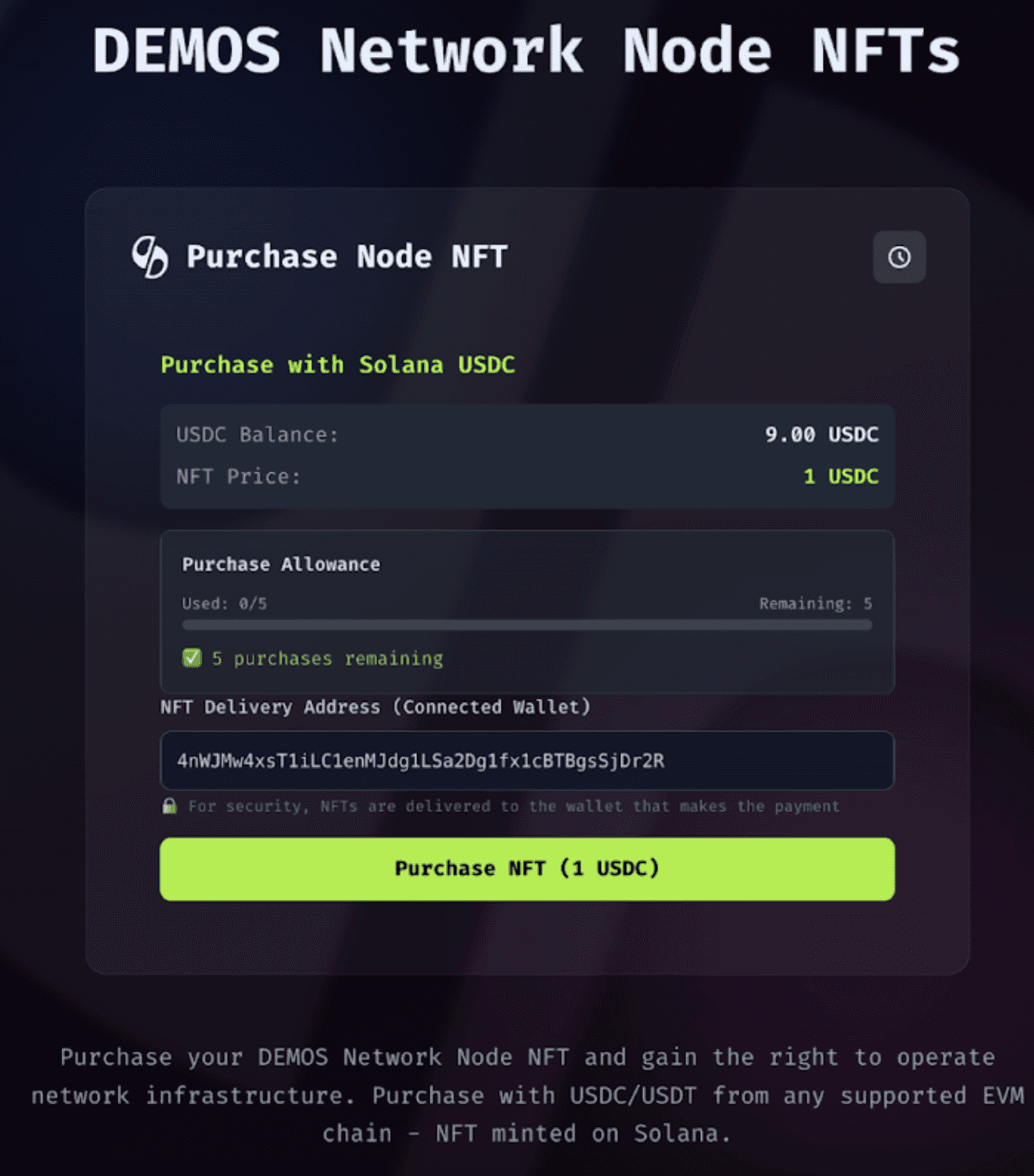
Note: mint price on live version is $1200
Step 3: Check Allowance
Verify your purchase allowance (5 max) for the transaction.
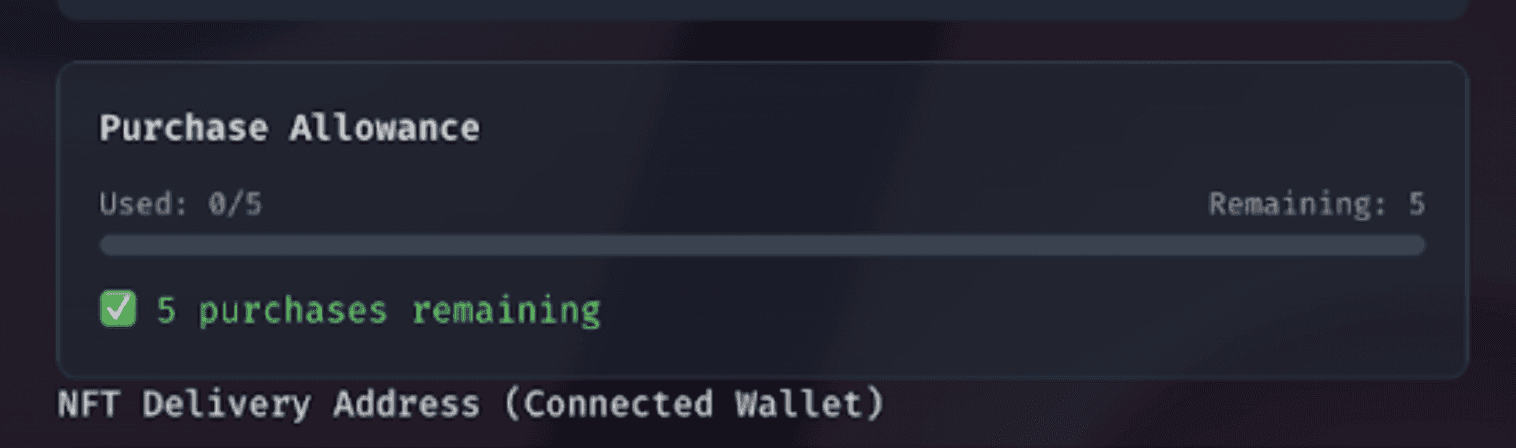
Step 4: Select Payment CurrencyIf purchasing from Ethereum/EVM: Choose whether you will purchase with USDC or USDT.
On Solana you will only be able to pay using USDC.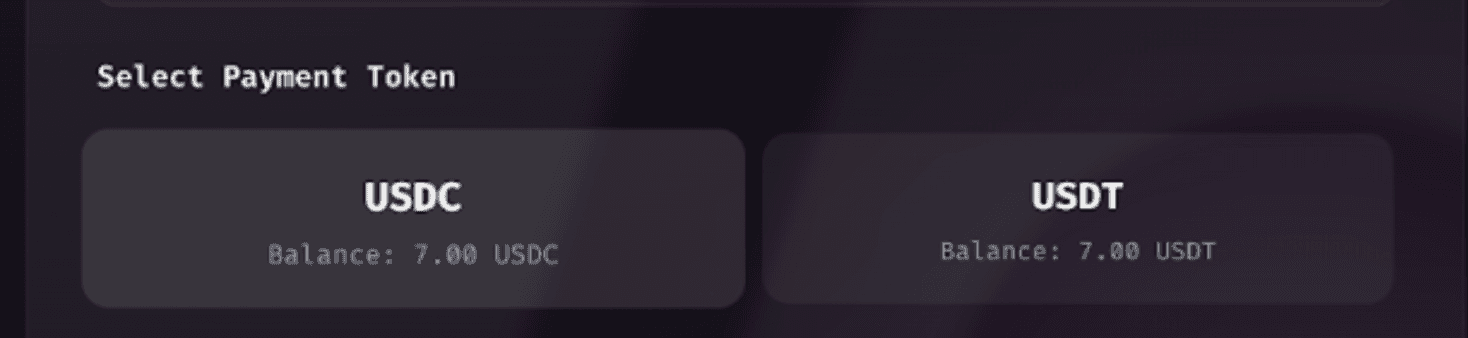
Step 5: Enter Destination Wallet• If purchasing from Ethereum/EVM: Enter your destination Solana wallet address in the field below
• If purchasing from Solana: The destination wallet will be automatically populated with your purchasing wallet address
Step 6: Complete TransactionApprove the spending cap request, then confirm the transaction request.(note mint.tunnelsenpai.win is the dev environment)
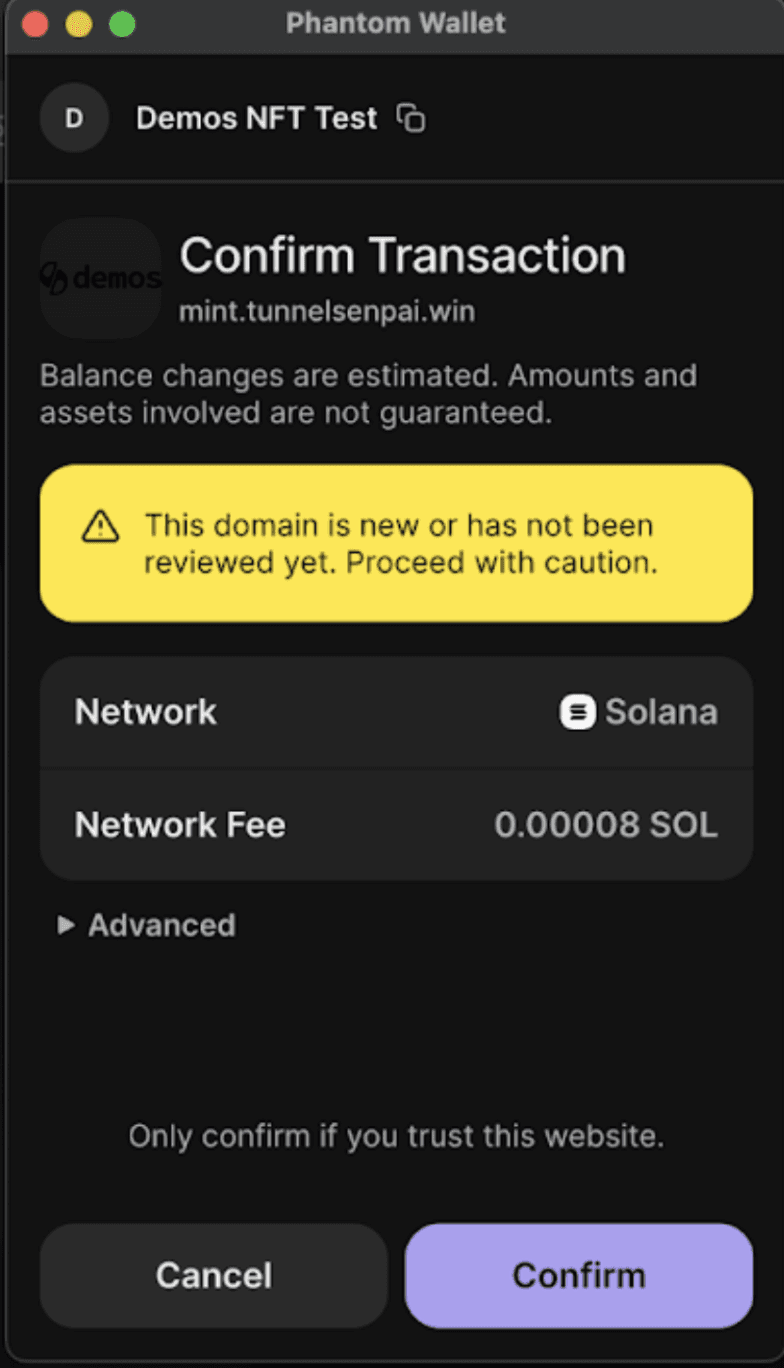
Note: mint.tnnesenpai.win will show as mint.demos.sh in the live version
Step 7: ConfirmationYou will receive a receipt confirming your purchase.
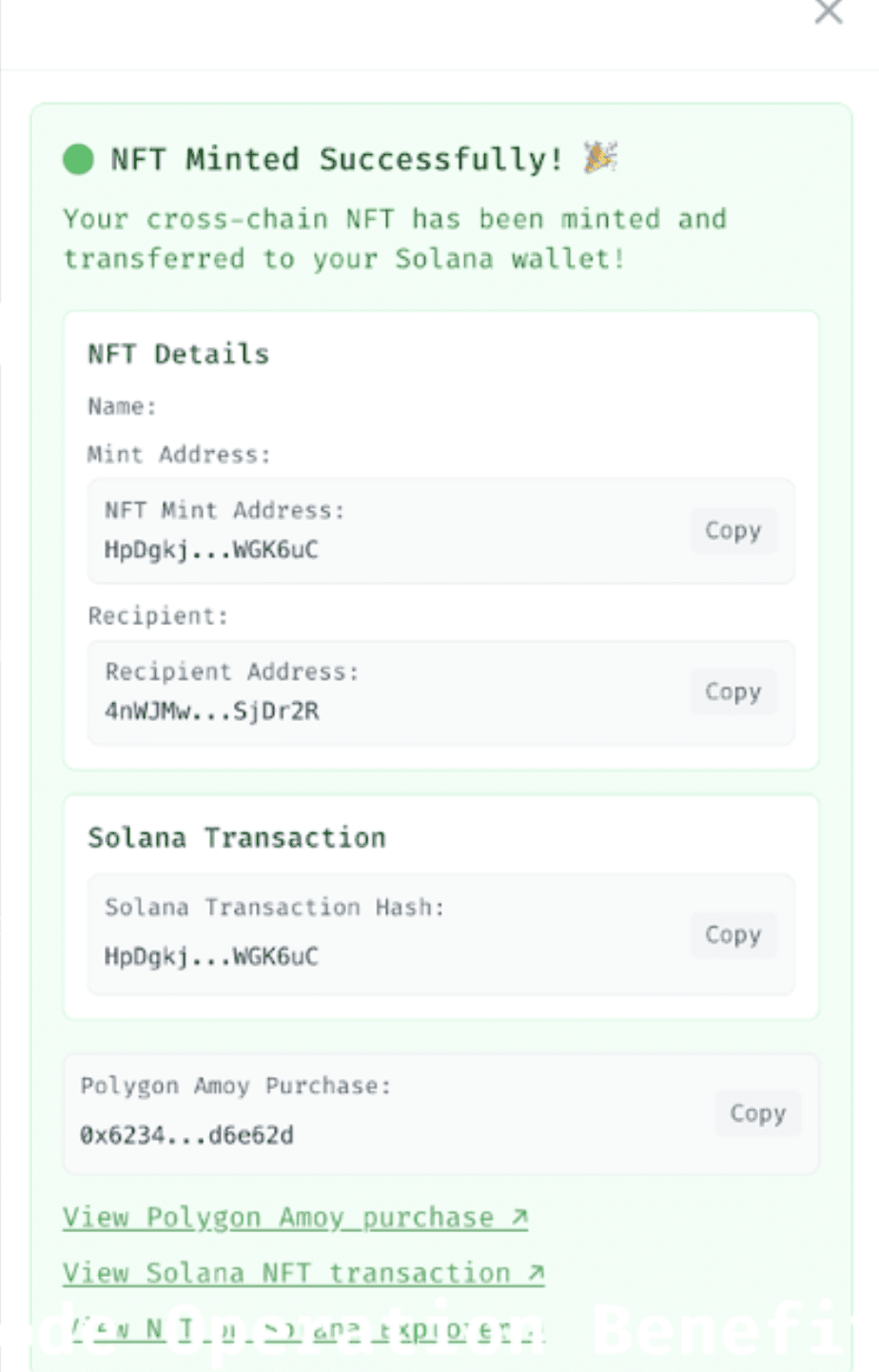
Congratulations and welcome to the Omniweb!Support
Your NFT will appear in your wallet shortly after purchase. If you experience any issues or have questions, please contact us on Telegram
Demos Network
Welcome to the Omniweb
t.meThank you for being part of the Demos community!
Welcome to the Demos NFT Sale - Community Phase
Sale Requirements
Website:
Required Holdings: $1,200 per NFT (plus gas)
Eligibility: Please review previous articles here
Accepted Currencies: USDC or USDT for EVM, USDC only for Solana
Supported Networks: Ethereum, Polygon, Base, Arbitrum, and SolanaPurchase Instructions
Step 1: Connect Your Whitelisted Wallet
Ensure your wallet is on the correct network and that you're using the account that has been whitelisted for the sale.• For Solana purchases: Click the purple button• For Ethereum/EVM purchases:Click the orange button
Step 2: Review Purchase Details
Once connected, you will see the price you will pay for the NFT.
Note: mint price on live version is $1200
Step 3: Check Allowance
Verify your purchase allowance (5 max) for the transaction.
Step 4: Select Payment CurrencyIf purchasing from Ethereum/EVM: Choose whether you will purchase with USDC or USDT.
On Solana you will only be able to pay using USDC.
Step 5: Enter Destination Wallet• If purchasing from Ethereum/EVM: Enter your destination Solana wallet address in the field below
• If purchasing from Solana: The destination wallet will be automatically populated with your purchasing wallet address
Step 6: Complete TransactionApprove the spending cap request, then confirm the transaction request.(note mint.tunnelsenpai.win is the dev environment)
Note: mint.tnnesenpai.win will show as mint.demos.sh in the live version
Step 7: ConfirmationYou will receive a receipt confirming your purchase.
Congratulations and welcome to the Omniweb!Support
Your NFT will appear in your wallet shortly after purchase. If you experience any issues or have questions, please contact us on Telegram
Demos Network
Welcome to the Omniweb
t.meThank you for being part of the Demos community!
Welcome to the Demos NFT Sale - Community Phase
Sale Requirements
Website:
Required Holdings: $1,200 per NFT (plus gas)
Eligibility: Please review previous articles here
Accepted Currencies: USDC or USDT for EVM, USDC only for Solana
Supported Networks: Ethereum, Polygon, Base, Arbitrum, and SolanaPurchase Instructions
Step 1: Connect Your Whitelisted Wallet
Ensure your wallet is on the correct network and that you're using the account that has been whitelisted for the sale.• For Solana purchases: Click the purple button• For Ethereum/EVM purchases:Click the orange button
Step 2: Review Purchase Details
Once connected, you will see the price you will pay for the NFT.
Note: mint price on live version is $1200
Step 3: Check Allowance
Verify your purchase allowance (5 max) for the transaction.
Step 4: Select Payment CurrencyIf purchasing from Ethereum/EVM: Choose whether you will purchase with USDC or USDT.
On Solana you will only be able to pay using USDC.
Step 5: Enter Destination Wallet• If purchasing from Ethereum/EVM: Enter your destination Solana wallet address in the field below
• If purchasing from Solana: The destination wallet will be automatically populated with your purchasing wallet address
Step 6: Complete TransactionApprove the spending cap request, then confirm the transaction request.(note mint.tunnelsenpai.win is the dev environment)
Note: mint.tnnesenpai.win will show as mint.demos.sh in the live version
Step 7: ConfirmationYou will receive a receipt confirming your purchase.
Congratulations and welcome to the Omniweb!Support
Your NFT will appear in your wallet shortly after purchase. If you experience any issues or have questions, please contact us on Telegram
Demos Network
Welcome to the Omniweb
t.meThank you for being part of the Demos community!
Welcome to the Demos NFT Sale - Community Phase
Sale Requirements
Website:
Required Holdings: $1,200 per NFT (plus gas)
Eligibility: Please review previous articles here
Accepted Currencies: USDC or USDT for EVM, USDC only for Solana
Supported Networks: Ethereum, Polygon, Base, Arbitrum, and SolanaPurchase Instructions
Step 1: Connect Your Whitelisted Wallet
Ensure your wallet is on the correct network and that you're using the account that has been whitelisted for the sale.• For Solana purchases: Click the purple button• For Ethereum/EVM purchases:Click the orange button
Step 2: Review Purchase Details
Once connected, you will see the price you will pay for the NFT.
Note: mint price on live version is $1200
Step 3: Check Allowance
Verify your purchase allowance (5 max) for the transaction.
Step 4: Select Payment CurrencyIf purchasing from Ethereum/EVM: Choose whether you will purchase with USDC or USDT.
On Solana you will only be able to pay using USDC.
Step 5: Enter Destination Wallet• If purchasing from Ethereum/EVM: Enter your destination Solana wallet address in the field below
• If purchasing from Solana: The destination wallet will be automatically populated with your purchasing wallet address
Step 6: Complete TransactionApprove the spending cap request, then confirm the transaction request.(note mint.tunnelsenpai.win is the dev environment)
Note: mint.tnnesenpai.win will show as mint.demos.sh in the live version
Step 7: ConfirmationYou will receive a receipt confirming your purchase.
Congratulations and welcome to the Omniweb!Support
Your NFT will appear in your wallet shortly after purchase. If you experience any issues or have questions, please contact us on Telegram
Demos Network
Welcome to the Omniweb
t.meThank you for being part of the Demos community!
Welcome to the Demos NFT Sale - Community Phase
Sale Requirements
Website:
Required Holdings: $1,200 per NFT (plus gas)
Eligibility: Please review previous articles here
Accepted Currencies: USDC or USDT for EVM, USDC only for Solana
Supported Networks: Ethereum, Polygon, Base, Arbitrum, and SolanaPurchase Instructions
Step 1: Connect Your Whitelisted Wallet
Ensure your wallet is on the correct network and that you're using the account that has been whitelisted for the sale.• For Solana purchases: Click the purple button• For Ethereum/EVM purchases:Click the orange button
Step 2: Review Purchase Details
Once connected, you will see the price you will pay for the NFT.
Note: mint price on live version is $1200
Step 3: Check Allowance
Verify your purchase allowance (5 max) for the transaction.
Step 4: Select Payment CurrencyIf purchasing from Ethereum/EVM: Choose whether you will purchase with USDC or USDT.
On Solana you will only be able to pay using USDC.
Step 5: Enter Destination Wallet• If purchasing from Ethereum/EVM: Enter your destination Solana wallet address in the field below
• If purchasing from Solana: The destination wallet will be automatically populated with your purchasing wallet address
Step 6: Complete TransactionApprove the spending cap request, then confirm the transaction request.(note mint.tunnelsenpai.win is the dev environment)
Note: mint.tnnesenpai.win will show as mint.demos.sh in the live version
Step 7: ConfirmationYou will receive a receipt confirming your purchase.
Congratulations and welcome to the Omniweb!Support
Your NFT will appear in your wallet shortly after purchase. If you experience any issues or have questions, please contact us on Telegram
Demos Network
Welcome to the Omniweb
t.meThank you for being part of the Demos community!
Welcome to the Demos NFT Sale - Community Phase
Sale Requirements
Website:
Required Holdings: $1,200 per NFT (plus gas)
Eligibility: Please review previous articles here
Accepted Currencies: USDC or USDT for EVM, USDC only for Solana
Supported Networks: Ethereum, Polygon, Base, Arbitrum, and SolanaPurchase Instructions
Step 1: Connect Your Whitelisted Wallet
Ensure your wallet is on the correct network and that you're using the account that has been whitelisted for the sale.• For Solana purchases: Click the purple button• For Ethereum/EVM purchases:Click the orange button
Step 2: Review Purchase Details
Once connected, you will see the price you will pay for the NFT.
Note: mint price on live version is $1200
Step 3: Check Allowance
Verify your purchase allowance (5 max) for the transaction.
Step 4: Select Payment CurrencyIf purchasing from Ethereum/EVM: Choose whether you will purchase with USDC or USDT.
On Solana you will only be able to pay using USDC.
Step 5: Enter Destination Wallet• If purchasing from Ethereum/EVM: Enter your destination Solana wallet address in the field below
• If purchasing from Solana: The destination wallet will be automatically populated with your purchasing wallet address
Step 6: Complete TransactionApprove the spending cap request, then confirm the transaction request.(note mint.tunnelsenpai.win is the dev environment)
Note: mint.tnnesenpai.win will show as mint.demos.sh in the live version
Step 7: ConfirmationYou will receive a receipt confirming your purchase.
Congratulations and welcome to the Omniweb!Support
Your NFT will appear in your wallet shortly after purchase. If you experience any issues or have questions, please contact us on Telegram
Demos Network
Welcome to the Omniweb
t.meThank you for being part of the Demos community!
Welcome to the Demos NFT Sale - Community Phase
Sale Requirements
Website:
Required Holdings: $1,200 per NFT (plus gas)
Eligibility: Please review previous articles here
Accepted Currencies: USDC or USDT for EVM, USDC only for Solana
Supported Networks: Ethereum, Polygon, Base, Arbitrum, and SolanaPurchase Instructions
Step 1: Connect Your Whitelisted Wallet
Ensure your wallet is on the correct network and that you're using the account that has been whitelisted for the sale.• For Solana purchases: Click the purple button• For Ethereum/EVM purchases:Click the orange button
Step 2: Review Purchase Details
Once connected, you will see the price you will pay for the NFT.
Note: mint price on live version is $1200
Step 3: Check Allowance
Verify your purchase allowance (5 max) for the transaction.
Step 4: Select Payment CurrencyIf purchasing from Ethereum/EVM: Choose whether you will purchase with USDC or USDT.
On Solana you will only be able to pay using USDC.
Step 5: Enter Destination Wallet• If purchasing from Ethereum/EVM: Enter your destination Solana wallet address in the field below
• If purchasing from Solana: The destination wallet will be automatically populated with your purchasing wallet address
Step 6: Complete TransactionApprove the spending cap request, then confirm the transaction request.(note mint.tunnelsenpai.win is the dev environment)
Note: mint.tnnesenpai.win will show as mint.demos.sh in the live version
Step 7: ConfirmationYou will receive a receipt confirming your purchase.
Congratulations and welcome to the Omniweb!Support
Your NFT will appear in your wallet shortly after purchase. If you experience any issues or have questions, please contact us on Telegram
Demos Network
Welcome to the Omniweb
t.meThank you for being part of the Demos community!
Welcome to the Demos NFT Sale - Community Phase
Sale Requirements
Website:
Required Holdings: $1,200 per NFT (plus gas)
Eligibility: Please review previous articles here
Accepted Currencies: USDC or USDT for EVM, USDC only for Solana
Supported Networks: Ethereum, Polygon, Base, Arbitrum, and SolanaPurchase Instructions
Step 1: Connect Your Whitelisted Wallet
Ensure your wallet is on the correct network and that you're using the account that has been whitelisted for the sale.• For Solana purchases: Click the purple button• For Ethereum/EVM purchases:Click the orange button
Step 2: Review Purchase Details
Once connected, you will see the price you will pay for the NFT.
Note: mint price on live version is $1200
Step 3: Check Allowance
Verify your purchase allowance (5 max) for the transaction.
Step 4: Select Payment CurrencyIf purchasing from Ethereum/EVM: Choose whether you will purchase with USDC or USDT.
On Solana you will only be able to pay using USDC.
Step 5: Enter Destination Wallet• If purchasing from Ethereum/EVM: Enter your destination Solana wallet address in the field below
• If purchasing from Solana: The destination wallet will be automatically populated with your purchasing wallet address
Step 6: Complete TransactionApprove the spending cap request, then confirm the transaction request.(note mint.tunnelsenpai.win is the dev environment)
Note: mint.tnnesenpai.win will show as mint.demos.sh in the live version
Step 7: ConfirmationYou will receive a receipt confirming your purchase.
Congratulations and welcome to the Omniweb!Support
Your NFT will appear in your wallet shortly after purchase. If you experience any issues or have questions, please contact us on Telegram
Demos Network
Welcome to the Omniweb
t.meThank you for being part of the Demos community!
Welcome to the Demos NFT Sale - Community Phase
Sale Requirements
Website:
Required Holdings: $1,200 per NFT (plus gas)
Eligibility: Please review previous articles here
Accepted Currencies: USDC or USDT for EVM, USDC only for Solana
Supported Networks: Ethereum, Polygon, Base, Arbitrum, and SolanaPurchase Instructions
Step 1: Connect Your Whitelisted Wallet
Ensure your wallet is on the correct network and that you're using the account that has been whitelisted for the sale.• For Solana purchases: Click the purple button• For Ethereum/EVM purchases:Click the orange button
Step 2: Review Purchase Details
Once connected, you will see the price you will pay for the NFT.
Note: mint price on live version is $1200
Step 3: Check Allowance
Verify your purchase allowance (5 max) for the transaction.
Step 4: Select Payment CurrencyIf purchasing from Ethereum/EVM: Choose whether you will purchase with USDC or USDT.
On Solana you will only be able to pay using USDC.
Step 5: Enter Destination Wallet• If purchasing from Ethereum/EVM: Enter your destination Solana wallet address in the field below
• If purchasing from Solana: The destination wallet will be automatically populated with your purchasing wallet address
Step 6: Complete TransactionApprove the spending cap request, then confirm the transaction request.(note mint.tunnelsenpai.win is the dev environment)
Note: mint.tnnesenpai.win will show as mint.demos.sh in the live version
Step 7: ConfirmationYou will receive a receipt confirming your purchase.
Congratulations and welcome to the Omniweb!Support
Your NFT will appear in your wallet shortly after purchase. If you experience any issues or have questions, please contact us on Telegram
Demos Network
Welcome to the Omniweb
t.meThank you for being part of the Demos community!
Welcome to the Demos NFT Sale - Community Phase
Sale Requirements
Website:
Required Holdings: $1,200 per NFT (plus gas)
Eligibility: Please review previous articles here
Accepted Currencies: USDC or USDT for EVM, USDC only for Solana
Supported Networks: Ethereum, Polygon, Base, Arbitrum, and SolanaPurchase Instructions
Step 1: Connect Your Whitelisted Wallet
Ensure your wallet is on the correct network and that you're using the account that has been whitelisted for the sale.• For Solana purchases: Click the purple button• For Ethereum/EVM purchases:Click the orange button
Step 2: Review Purchase Details
Once connected, you will see the price you will pay for the NFT.
Note: mint price on live version is $1200
Step 3: Check Allowance
Verify your purchase allowance (5 max) for the transaction.
Step 4: Select Payment CurrencyIf purchasing from Ethereum/EVM: Choose whether you will purchase with USDC or USDT.
On Solana you will only be able to pay using USDC.
Step 5: Enter Destination Wallet• If purchasing from Ethereum/EVM: Enter your destination Solana wallet address in the field below
• If purchasing from Solana: The destination wallet will be automatically populated with your purchasing wallet address
Step 6: Complete TransactionApprove the spending cap request, then confirm the transaction request.(note mint.tunnelsenpai.win is the dev environment)
Note: mint.tnnesenpai.win will show as mint.demos.sh in the live version
Step 7: ConfirmationYou will receive a receipt confirming your purchase.
Congratulations and welcome to the Omniweb!Support
Your NFT will appear in your wallet shortly after purchase. If you experience any issues or have questions, please contact us on Telegram
Demos Network
Welcome to the Omniweb
t.meThank you for being part of the Demos community!
Welcome to the Demos NFT Sale - Community Phase
Sale Requirements
Website:
Required Holdings: $1,200 per NFT (plus gas)
Eligibility: Please review previous articles here
Accepted Currencies: USDC or USDT for EVM, USDC only for Solana
Supported Networks: Ethereum, Polygon, Base, Arbitrum, and SolanaPurchase Instructions
Step 1: Connect Your Whitelisted Wallet
Ensure your wallet is on the correct network and that you're using the account that has been whitelisted for the sale.• For Solana purchases: Click the purple button• For Ethereum/EVM purchases:Click the orange button
Step 2: Review Purchase Details
Once connected, you will see the price you will pay for the NFT.
Note: mint price on live version is $1200
Step 3: Check Allowance
Verify your purchase allowance (5 max) for the transaction.
Step 4: Select Payment CurrencyIf purchasing from Ethereum/EVM: Choose whether you will purchase with USDC or USDT.
On Solana you will only be able to pay using USDC.
Step 5: Enter Destination Wallet• If purchasing from Ethereum/EVM: Enter your destination Solana wallet address in the field below
• If purchasing from Solana: The destination wallet will be automatically populated with your purchasing wallet address
Step 6: Complete TransactionApprove the spending cap request, then confirm the transaction request.(note mint.tunnelsenpai.win is the dev environment)
Note: mint.tnnesenpai.win will show as mint.demos.sh in the live version
Step 7: ConfirmationYou will receive a receipt confirming your purchase.
Congratulations and welcome to the Omniweb!Support
Your NFT will appear in your wallet shortly after purchase. If you experience any issues or have questions, please contact us on Telegram
Demos Network
Welcome to the Omniweb
t.meThank you for being part of the Demos community!
Welcome to the Demos NFT Sale - Community Phase
Sale Requirements
Website:
Required Holdings: $1,200 per NFT (plus gas)
Eligibility: Please review previous articles here
Accepted Currencies: USDC or USDT for EVM, USDC only for Solana
Supported Networks: Ethereum, Polygon, Base, Arbitrum, and SolanaPurchase Instructions
Step 1: Connect Your Whitelisted Wallet
Ensure your wallet is on the correct network and that you're using the account that has been whitelisted for the sale.• For Solana purchases: Click the purple button• For Ethereum/EVM purchases:Click the orange button
Step 2: Review Purchase Details
Once connected, you will see the price you will pay for the NFT.
Note: mint price on live version is $1200
Step 3: Check Allowance
Verify your purchase allowance (5 max) for the transaction.
Step 4: Select Payment CurrencyIf purchasing from Ethereum/EVM: Choose whether you will purchase with USDC or USDT.
On Solana you will only be able to pay using USDC.
Step 5: Enter Destination Wallet• If purchasing from Ethereum/EVM: Enter your destination Solana wallet address in the field below
• If purchasing from Solana: The destination wallet will be automatically populated with your purchasing wallet address
Step 6: Complete TransactionApprove the spending cap request, then confirm the transaction request.(note mint.tunnelsenpai.win is the dev environment)
Note: mint.tnnesenpai.win will show as mint.demos.sh in the live version
Step 7: ConfirmationYou will receive a receipt confirming your purchase.
Congratulations and welcome to the Omniweb!Support
Your NFT will appear in your wallet shortly after purchase. If you experience any issues or have questions, please contact us on Telegram
Demos Network
Welcome to the Omniweb
t.meThank you for being part of the Demos community!
Welcome to the Demos NFT Sale - Community Phase
Sale Requirements
Website:
Required Holdings: $1,200 per NFT (plus gas)
Eligibility: Please review previous articles here
Accepted Currencies: USDC or USDT for EVM, USDC only for Solana
Supported Networks: Ethereum, Polygon, Base, Arbitrum, and SolanaPurchase Instructions
Step 1: Connect Your Whitelisted Wallet
Ensure your wallet is on the correct network and that you're using the account that has been whitelisted for the sale.• For Solana purchases: Click the purple button• For Ethereum/EVM purchases:Click the orange button
Step 2: Review Purchase Details
Once connected, you will see the price you will pay for the NFT.
Note: mint price on live version is $1200
Step 3: Check Allowance
Verify your purchase allowance (5 max) for the transaction.
Step 4: Select Payment CurrencyIf purchasing from Ethereum/EVM: Choose whether you will purchase with USDC or USDT.
On Solana you will only be able to pay using USDC.
Step 5: Enter Destination Wallet• If purchasing from Ethereum/EVM: Enter your destination Solana wallet address in the field below
• If purchasing from Solana: The destination wallet will be automatically populated with your purchasing wallet address
Step 6: Complete TransactionApprove the spending cap request, then confirm the transaction request.(note mint.tunnelsenpai.win is the dev environment)
Note: mint.tnnesenpai.win will show as mint.demos.sh in the live version
Step 7: ConfirmationYou will receive a receipt confirming your purchase.
Congratulations and welcome to the Omniweb!Support
Your NFT will appear in your wallet shortly after purchase. If you experience any issues or have questions, please contact us on Telegram
Demos Network
Welcome to the Omniweb
t.meThank you for being part of the Demos community!
Welcome to the Demos NFT Sale - Community Phase
Sale Requirements
Website:
Required Holdings: $1,200 per NFT (plus gas)
Eligibility: Please review previous articles here
Accepted Currencies: USDC or USDT for EVM, USDC only for Solana
Supported Networks: Ethereum, Polygon, Base, Arbitrum, and SolanaPurchase Instructions
Step 1: Connect Your Whitelisted Wallet
Ensure your wallet is on the correct network and that you're using the account that has been whitelisted for the sale.• For Solana purchases: Click the purple button• For Ethereum/EVM purchases:Click the orange button
Step 2: Review Purchase Details
Once connected, you will see the price you will pay for the NFT.
Note: mint price on live version is $1200
Step 3: Check Allowance
Verify your purchase allowance (5 max) for the transaction.
Step 4: Select Payment CurrencyIf purchasing from Ethereum/EVM: Choose whether you will purchase with USDC or USDT.
On Solana you will only be able to pay using USDC.
Step 5: Enter Destination Wallet• If purchasing from Ethereum/EVM: Enter your destination Solana wallet address in the field below
• If purchasing from Solana: The destination wallet will be automatically populated with your purchasing wallet address
Step 6: Complete TransactionApprove the spending cap request, then confirm the transaction request.(note mint.tunnelsenpai.win is the dev environment)
Note: mint.tnnesenpai.win will show as mint.demos.sh in the live version
Step 7: ConfirmationYou will receive a receipt confirming your purchase.
Congratulations and welcome to the Omniweb!Support
Your NFT will appear in your wallet shortly after purchase. If you experience any issues or have questions, please contact us on Telegram
Demos Network
Welcome to the Omniweb
t.meThank you for being part of the Demos community!
Welcome to the Demos NFT Sale - Community Phase
Sale Requirements
Website:
Required Holdings: $1,200 per NFT (plus gas)
Eligibility: Please review previous articles here
Accepted Currencies: USDC or USDT for EVM, USDC only for Solana
Supported Networks: Ethereum, Polygon, Base, Arbitrum, and SolanaPurchase Instructions
Step 1: Connect Your Whitelisted Wallet
Ensure your wallet is on the correct network and that you're using the account that has been whitelisted for the sale.• For Solana purchases: Click the purple button• For Ethereum/EVM purchases:Click the orange button
Step 2: Review Purchase Details
Once connected, you will see the price you will pay for the NFT.
Note: mint price on live version is $1200
Step 3: Check Allowance
Verify your purchase allowance (5 max) for the transaction.
Step 4: Select Payment CurrencyIf purchasing from Ethereum/EVM: Choose whether you will purchase with USDC or USDT.
On Solana you will only be able to pay using USDC.
Step 5: Enter Destination Wallet• If purchasing from Ethereum/EVM: Enter your destination Solana wallet address in the field below
• If purchasing from Solana: The destination wallet will be automatically populated with your purchasing wallet address
Step 6: Complete TransactionApprove the spending cap request, then confirm the transaction request.(note mint.tunnelsenpai.win is the dev environment)
Note: mint.tnnesenpai.win will show as mint.demos.sh in the live version
Step 7: ConfirmationYou will receive a receipt confirming your purchase.
Congratulations and welcome to the Omniweb!Support
Your NFT will appear in your wallet shortly after purchase. If you experience any issues or have questions, please contact us on Telegram
Demos Network
Welcome to the Omniweb
t.meThank you for being part of the Demos community!
Welcome to the Demos NFT Sale - Community Phase
Sale Requirements
Website:
Required Holdings: $1,200 per NFT (plus gas)
Eligibility: Please review previous articles here
Accepted Currencies: USDC or USDT for EVM, USDC only for Solana
Supported Networks: Ethereum, Polygon, Base, Arbitrum, and SolanaPurchase Instructions
Step 1: Connect Your Whitelisted Wallet
Ensure your wallet is on the correct network and that you're using the account that has been whitelisted for the sale.• For Solana purchases: Click the purple button• For Ethereum/EVM purchases:Click the orange button
Step 2: Review Purchase Details
Once connected, you will see the price you will pay for the NFT.
Note: mint price on live version is $1200
Step 3: Check Allowance
Verify your purchase allowance (5 max) for the transaction.
Step 4: Select Payment CurrencyIf purchasing from Ethereum/EVM: Choose whether you will purchase with USDC or USDT.
On Solana you will only be able to pay using USDC.
Step 5: Enter Destination Wallet• If purchasing from Ethereum/EVM: Enter your destination Solana wallet address in the field below
• If purchasing from Solana: The destination wallet will be automatically populated with your purchasing wallet address
Step 6: Complete TransactionApprove the spending cap request, then confirm the transaction request.(note mint.tunnelsenpai.win is the dev environment)
Note: mint.tnnesenpai.win will show as mint.demos.sh in the live version
Step 7: ConfirmationYou will receive a receipt confirming your purchase.
Congratulations and welcome to the Omniweb!Support
Your NFT will appear in your wallet shortly after purchase. If you experience any issues or have questions, please contact us on Telegram
Demos Network
Welcome to the Omniweb
t.meThank you for being part of the Demos community!
Welcome to the Demos NFT Sale - Community Phase
Sale Requirements
Website:
Required Holdings: $1,200 per NFT (plus gas)
Eligibility: Please review previous articles here
Accepted Currencies: USDC or USDT for EVM, USDC only for Solana
Supported Networks: Ethereum, Polygon, Base, Arbitrum, and SolanaPurchase Instructions
Step 1: Connect Your Whitelisted Wallet
Ensure your wallet is on the correct network and that you're using the account that has been whitelisted for the sale.• For Solana purchases: Click the purple button• For Ethereum/EVM purchases:Click the orange button
Step 2: Review Purchase Details
Once connected, you will see the price you will pay for the NFT.
Note: mint price on live version is $1200
Step 3: Check Allowance
Verify your purchase allowance (5 max) for the transaction.
Step 4: Select Payment CurrencyIf purchasing from Ethereum/EVM: Choose whether you will purchase with USDC or USDT.
On Solana you will only be able to pay using USDC.
Step 5: Enter Destination Wallet• If purchasing from Ethereum/EVM: Enter your destination Solana wallet address in the field below
• If purchasing from Solana: The destination wallet will be automatically populated with your purchasing wallet address
Step 6: Complete TransactionApprove the spending cap request, then confirm the transaction request.(note mint.tunnelsenpai.win is the dev environment)
Note: mint.tnnesenpai.win will show as mint.demos.sh in the live version
Step 7: ConfirmationYou will receive a receipt confirming your purchase.
Congratulations and welcome to the Omniweb!Support
Your NFT will appear in your wallet shortly after purchase. If you experience any issues or have questions, please contact us on Telegram
Demos Network
Welcome to the Omniweb
t.meThank you for being part of the Demos community!
Welcome to the Demos NFT Sale - Community Phase
Sale Requirements
Website:
Required Holdings: $1,200 per NFT (plus gas)
Eligibility: Please review previous articles here
Accepted Currencies: USDC or USDT for EVM, USDC only for Solana
Supported Networks: Ethereum, Polygon, Base, Arbitrum, and SolanaPurchase Instructions
Step 1: Connect Your Whitelisted Wallet
Ensure your wallet is on the correct network and that you're using the account that has been whitelisted for the sale.• For Solana purchases: Click the purple button• For Ethereum/EVM purchases:Click the orange button
Step 2: Review Purchase Details
Once connected, you will see the price you will pay for the NFT.
Note: mint price on live version is $1200
Step 3: Check Allowance
Verify your purchase allowance (5 max) for the transaction.
Step 4: Select Payment CurrencyIf purchasing from Ethereum/EVM: Choose whether you will purchase with USDC or USDT.
On Solana you will only be able to pay using USDC.
Step 5: Enter Destination Wallet• If purchasing from Ethereum/EVM: Enter your destination Solana wallet address in the field below
• If purchasing from Solana: The destination wallet will be automatically populated with your purchasing wallet address
Step 6: Complete TransactionApprove the spending cap request, then confirm the transaction request.(note mint.tunnelsenpai.win is the dev environment)
Note: mint.tnnesenpai.win will show as mint.demos.sh in the live version
Step 7: ConfirmationYou will receive a receipt confirming your purchase.
Congratulations and welcome to the Omniweb!Support
Your NFT will appear in your wallet shortly after purchase. If you experience any issues or have questions, please contact us on Telegram
Demos Network
Welcome to the Omniweb
t.meThank you for being part of the Demos community!
Welcome to the Demos NFT Sale - Community Phase
Sale Requirements
Website:
Required Holdings: $1,200 per NFT (plus gas)
Eligibility: Please review previous articles here
Accepted Currencies: USDC or USDT for EVM, USDC only for Solana
Supported Networks: Ethereum, Polygon, Base, Arbitrum, and SolanaPurchase Instructions
Step 1: Connect Your Whitelisted Wallet
Ensure your wallet is on the correct network and that you're using the account that has been whitelisted for the sale.• For Solana purchases: Click the purple button• For Ethereum/EVM purchases:Click the orange button
Step 2: Review Purchase Details
Once connected, you will see the price you will pay for the NFT.
Note: mint price on live version is $1200
Step 3: Check Allowance
Verify your purchase allowance (5 max) for the transaction.
Step 4: Select Payment CurrencyIf purchasing from Ethereum/EVM: Choose whether you will purchase with USDC or USDT.
On Solana you will only be able to pay using USDC.
Step 5: Enter Destination Wallet• If purchasing from Ethereum/EVM: Enter your destination Solana wallet address in the field below
• If purchasing from Solana: The destination wallet will be automatically populated with your purchasing wallet address
Step 6: Complete TransactionApprove the spending cap request, then confirm the transaction request.(note mint.tunnelsenpai.win is the dev environment)
Note: mint.tnnesenpai.win will show as mint.demos.sh in the live version
Step 7: ConfirmationYou will receive a receipt confirming your purchase.
Congratulations and welcome to the Omniweb!Support
Your NFT will appear in your wallet shortly after purchase. If you experience any issues or have questions, please contact us on Telegram
Demos Network
Welcome to the Omniweb
t.meThank you for being part of the Demos community!
Welcome to the Demos NFT Sale - Community Phase
Sale Requirements
Website:
Required Holdings: $1,200 per NFT (plus gas)
Eligibility: Please review previous articles here
Accepted Currencies: USDC or USDT for EVM, USDC only for Solana
Supported Networks: Ethereum, Polygon, Base, Arbitrum, and SolanaPurchase Instructions
Step 1: Connect Your Whitelisted Wallet
Ensure your wallet is on the correct network and that you're using the account that has been whitelisted for the sale.• For Solana purchases: Click the purple button• For Ethereum/EVM purchases:Click the orange button
Step 2: Review Purchase Details
Once connected, you will see the price you will pay for the NFT.
Note: mint price on live version is $1200
Step 3: Check Allowance
Verify your purchase allowance (5 max) for the transaction.
Step 4: Select Payment CurrencyIf purchasing from Ethereum/EVM: Choose whether you will purchase with USDC or USDT.
On Solana you will only be able to pay using USDC.
Step 5: Enter Destination Wallet• If purchasing from Ethereum/EVM: Enter your destination Solana wallet address in the field below
• If purchasing from Solana: The destination wallet will be automatically populated with your purchasing wallet address
Step 6: Complete TransactionApprove the spending cap request, then confirm the transaction request.(note mint.tunnelsenpai.win is the dev environment)
Note: mint.tnnesenpai.win will show as mint.demos.sh in the live version
Step 7: ConfirmationYou will receive a receipt confirming your purchase.
Congratulations and welcome to the Omniweb!Support
Your NFT will appear in your wallet shortly after purchase. If you experience any issues or have questions, please contact us on Telegram
Demos Network
Welcome to the Omniweb
t.meThank you for being part of the Demos community!
Welcome to the Demos NFT Sale - Community Phase
Sale Requirements
Website:
Required Holdings: $1,200 per NFT (plus gas)
Eligibility: Please review previous articles here
Accepted Currencies: USDC or USDT for EVM, USDC only for Solana
Supported Networks: Ethereum, Polygon, Base, Arbitrum, and SolanaPurchase Instructions
Step 1: Connect Your Whitelisted Wallet
Ensure your wallet is on the correct network and that you're using the account that has been whitelisted for the sale.• For Solana purchases: Click the purple button• For Ethereum/EVM purchases:Click the orange button
Step 2: Review Purchase Details
Once connected, you will see the price you will pay for the NFT.
Note: mint price on live version is $1200
Step 3: Check Allowance
Verify your purchase allowance (5 max) for the transaction.
Step 4: Select Payment CurrencyIf purchasing from Ethereum/EVM: Choose whether you will purchase with USDC or USDT.
On Solana you will only be able to pay using USDC.
Step 5: Enter Destination Wallet• If purchasing from Ethereum/EVM: Enter your destination Solana wallet address in the field below
• If purchasing from Solana: The destination wallet will be automatically populated with your purchasing wallet address
Step 6: Complete TransactionApprove the spending cap request, then confirm the transaction request.(note mint.tunnelsenpai.win is the dev environment)
Note: mint.tnnesenpai.win will show as mint.demos.sh in the live version
Step 7: ConfirmationYou will receive a receipt confirming your purchase.
Congratulations and welcome to the Omniweb!Support
Your NFT will appear in your wallet shortly after purchase. If you experience any issues or have questions, please contact us on Telegram
Demos Network
Welcome to the Omniweb
t.meThank you for being part of the Demos community!
Welcome to the Demos NFT Sale - Community Phase
Sale Requirements
Website:
Required Holdings: $1,200 per NFT (plus gas)
Eligibility: Please review previous articles here
Accepted Currencies: USDC or USDT for EVM, USDC only for Solana
Supported Networks: Ethereum, Polygon, Base, Arbitrum, and SolanaPurchase Instructions
Step 1: Connect Your Whitelisted Wallet
Ensure your wallet is on the correct network and that you're using the account that has been whitelisted for the sale.• For Solana purchases: Click the purple button• For Ethereum/EVM purchases:Click the orange button
Step 2: Review Purchase Details
Once connected, you will see the price you will pay for the NFT.
Note: mint price on live version is $1200
Step 3: Check Allowance
Verify your purchase allowance (5 max) for the transaction.
Step 4: Select Payment CurrencyIf purchasing from Ethereum/EVM: Choose whether you will purchase with USDC or USDT.
On Solana you will only be able to pay using USDC.
Step 5: Enter Destination Wallet• If purchasing from Ethereum/EVM: Enter your destination Solana wallet address in the field below
• If purchasing from Solana: The destination wallet will be automatically populated with your purchasing wallet address
Step 6: Complete TransactionApprove the spending cap request, then confirm the transaction request.(note mint.tunnelsenpai.win is the dev environment)
Note: mint.tnnesenpai.win will show as mint.demos.sh in the live version
Step 7: ConfirmationYou will receive a receipt confirming your purchase.
Congratulations and welcome to the Omniweb!Support
Your NFT will appear in your wallet shortly after purchase. If you experience any issues or have questions, please contact us on Telegram
Demos Network
Welcome to the Omniweb
t.meThank you for being part of the Demos community!
Welcome to the Demos NFT Sale - Community Phase
Sale Requirements
Website:
Required Holdings: $1,200 per NFT (plus gas)
Eligibility: Please review previous articles here
Accepted Currencies: USDC or USDT for EVM, USDC only for Solana
Supported Networks: Ethereum, Polygon, Base, Arbitrum, and SolanaPurchase Instructions
Step 1: Connect Your Whitelisted Wallet
Ensure your wallet is on the correct network and that you're using the account that has been whitelisted for the sale.• For Solana purchases: Click the purple button• For Ethereum/EVM purchases:Click the orange button
Step 2: Review Purchase Details
Once connected, you will see the price you will pay for the NFT.
Note: mint price on live version is $1200
Step 3: Check Allowance
Verify your purchase allowance (5 max) for the transaction.
Step 4: Select Payment CurrencyIf purchasing from Ethereum/EVM: Choose whether you will purchase with USDC or USDT.
On Solana you will only be able to pay using USDC.
Step 5: Enter Destination Wallet• If purchasing from Ethereum/EVM: Enter your destination Solana wallet address in the field below
• If purchasing from Solana: The destination wallet will be automatically populated with your purchasing wallet address
Step 6: Complete TransactionApprove the spending cap request, then confirm the transaction request.(note mint.tunnelsenpai.win is the dev environment)
Note: mint.tnnesenpai.win will show as mint.demos.sh in the live version
Step 7: ConfirmationYou will receive a receipt confirming your purchase.
Congratulations and welcome to the Omniweb!Support
Your NFT will appear in your wallet shortly after purchase. If you experience any issues or have questions, please contact us on Telegram
Demos Network
Welcome to the Omniweb
t.meThank you for being part of the Demos community!
Welcome to the Demos NFT Sale - Community Phase
Sale Requirements
Website:
Required Holdings: $1,200 per NFT (plus gas)
Eligibility: Please review previous articles here
Accepted Currencies: USDC or USDT for EVM, USDC only for Solana
Supported Networks: Ethereum, Polygon, Base, Arbitrum, and SolanaPurchase Instructions
Step 1: Connect Your Whitelisted Wallet
Ensure your wallet is on the correct network and that you're using the account that has been whitelisted for the sale.• For Solana purchases: Click the purple button• For Ethereum/EVM purchases:Click the orange button
Step 2: Review Purchase Details
Once connected, you will see the price you will pay for the NFT.
Note: mint price on live version is $1200
Step 3: Check Allowance
Verify your purchase allowance (5 max) for the transaction.
Step 4: Select Payment CurrencyIf purchasing from Ethereum/EVM: Choose whether you will purchase with USDC or USDT.
On Solana you will only be able to pay using USDC.
Step 5: Enter Destination Wallet• If purchasing from Ethereum/EVM: Enter your destination Solana wallet address in the field below
• If purchasing from Solana: The destination wallet will be automatically populated with your purchasing wallet address
Step 6: Complete TransactionApprove the spending cap request, then confirm the transaction request.(note mint.tunnelsenpai.win is the dev environment)
Note: mint.tnnesenpai.win will show as mint.demos.sh in the live version
Step 7: ConfirmationYou will receive a receipt confirming your purchase.
Congratulations and welcome to the Omniweb!Support
Your NFT will appear in your wallet shortly after purchase. If you experience any issues or have questions, please contact us on Telegram
Demos Network
Welcome to the Omniweb
t.meThank you for being part of the Demos community!
Welcome to the Demos NFT Sale - Community Phase
Sale Requirements
Website:
Required Holdings: $1,200 per NFT (plus gas)
Eligibility: Please review previous articles here
Accepted Currencies: USDC or USDT for EVM, USDC only for Solana
Supported Networks: Ethereum, Polygon, Base, Arbitrum, and SolanaPurchase Instructions
Step 1: Connect Your Whitelisted Wallet
Ensure your wallet is on the correct network and that you're using the account that has been whitelisted for the sale.• For Solana purchases: Click the purple button• For Ethereum/EVM purchases:Click the orange button
Step 2: Review Purchase Details
Once connected, you will see the price you will pay for the NFT.
Note: mint price on live version is $1200
Step 3: Check Allowance
Verify your purchase allowance (5 max) for the transaction.
Step 4: Select Payment CurrencyIf purchasing from Ethereum/EVM: Choose whether you will purchase with USDC or USDT.
On Solana you will only be able to pay using USDC.
Step 5: Enter Destination Wallet• If purchasing from Ethereum/EVM: Enter your destination Solana wallet address in the field below
• If purchasing from Solana: The destination wallet will be automatically populated with your purchasing wallet address
Step 6: Complete TransactionApprove the spending cap request, then confirm the transaction request.(note mint.tunnelsenpai.win is the dev environment)
Note: mint.tnnesenpai.win will show as mint.demos.sh in the live version
Step 7: ConfirmationYou will receive a receipt confirming your purchase.
Congratulations and welcome to the Omniweb!Support
Your NFT will appear in your wallet shortly after purchase. If you experience any issues or have questions, please contact us on Telegram
Demos Network
Welcome to the Omniweb
t.meThank you for being part of the Demos community!
Welcome to the Demos NFT Sale - Community Phase
Sale Requirements
Website:
Required Holdings: $1,200 per NFT (plus gas)
Eligibility: Please review previous articles here
Accepted Currencies: USDC or USDT for EVM, USDC only for Solana
Supported Networks: Ethereum, Polygon, Base, Arbitrum, and SolanaPurchase Instructions
Step 1: Connect Your Whitelisted Wallet
Ensure your wallet is on the correct network and that you're using the account that has been whitelisted for the sale.• For Solana purchases: Click the purple button• For Ethereum/EVM purchases:Click the orange button
Step 2: Review Purchase Details
Once connected, you will see the price you will pay for the NFT.
Note: mint price on live version is $1200
Step 3: Check Allowance
Verify your purchase allowance (5 max) for the transaction.
Step 4: Select Payment CurrencyIf purchasing from Ethereum/EVM: Choose whether you will purchase with USDC or USDT.
On Solana you will only be able to pay using USDC.
Step 5: Enter Destination Wallet• If purchasing from Ethereum/EVM: Enter your destination Solana wallet address in the field below
• If purchasing from Solana: The destination wallet will be automatically populated with your purchasing wallet address
Step 6: Complete TransactionApprove the spending cap request, then confirm the transaction request.(note mint.tunnelsenpai.win is the dev environment)
Note: mint.tnnesenpai.win will show as mint.demos.sh in the live version
Step 7: ConfirmationYou will receive a receipt confirming your purchase.
Congratulations and welcome to the Omniweb!Support
Your NFT will appear in your wallet shortly after purchase. If you experience any issues or have questions, please contact us on Telegram
Demos Network
Welcome to the Omniweb
t.meThank you for being part of the Demos community!
Welcome to the Demos NFT Sale - Community Phase
Sale Requirements
Website:
Required Holdings: $1,200 per NFT (plus gas)
Eligibility: Please review previous articles here
Accepted Currencies: USDC or USDT for EVM, USDC only for Solana
Supported Networks: Ethereum, Polygon, Base, Arbitrum, and SolanaPurchase Instructions
Step 1: Connect Your Whitelisted Wallet
Ensure your wallet is on the correct network and that you're using the account that has been whitelisted for the sale.• For Solana purchases: Click the purple button• For Ethereum/EVM purchases:Click the orange button
Step 2: Review Purchase Details
Once connected, you will see the price you will pay for the NFT.
Note: mint price on live version is $1200
Step 3: Check Allowance
Verify your purchase allowance (5 max) for the transaction.
Step 4: Select Payment CurrencyIf purchasing from Ethereum/EVM: Choose whether you will purchase with USDC or USDT.
On Solana you will only be able to pay using USDC.
Step 5: Enter Destination Wallet• If purchasing from Ethereum/EVM: Enter your destination Solana wallet address in the field below
• If purchasing from Solana: The destination wallet will be automatically populated with your purchasing wallet address
Step 6: Complete TransactionApprove the spending cap request, then confirm the transaction request.(note mint.tunnelsenpai.win is the dev environment)
Note: mint.tnnesenpai.win will show as mint.demos.sh in the live version
Step 7: ConfirmationYou will receive a receipt confirming your purchase.
Congratulations and welcome to the Omniweb!Support
Your NFT will appear in your wallet shortly after purchase. If you experience any issues or have questions, please contact us on Telegram
Demos Network
Welcome to the Omniweb
t.meThank you for being part of the Demos community!
Welcome to the Demos NFT Sale - Community Phase
Sale Requirements
Website:
Required Holdings: $1,200 per NFT (plus gas)
Eligibility: Please review previous articles here
Accepted Currencies: USDC or USDT for EVM, USDC only for Solana
Supported Networks: Ethereum, Polygon, Base, Arbitrum, and SolanaPurchase Instructions
Step 1: Connect Your Whitelisted Wallet
Ensure your wallet is on the correct network and that you're using the account that has been whitelisted for the sale.• For Solana purchases: Click the purple button• For Ethereum/EVM purchases:Click the orange button
Step 2: Review Purchase Details
Once connected, you will see the price you will pay for the NFT.
Note: mint price on live version is $1200
Step 3: Check Allowance
Verify your purchase allowance (5 max) for the transaction.
Step 4: Select Payment CurrencyIf purchasing from Ethereum/EVM: Choose whether you will purchase with USDC or USDT.
On Solana you will only be able to pay using USDC.
Step 5: Enter Destination Wallet• If purchasing from Ethereum/EVM: Enter your destination Solana wallet address in the field below
• If purchasing from Solana: The destination wallet will be automatically populated with your purchasing wallet address
Step 6: Complete TransactionApprove the spending cap request, then confirm the transaction request.(note mint.tunnelsenpai.win is the dev environment)
Note: mint.tnnesenpai.win will show as mint.demos.sh in the live version
Step 7: ConfirmationYou will receive a receipt confirming your purchase.
Congratulations and welcome to the Omniweb!Support
Your NFT will appear in your wallet shortly after purchase. If you experience any issues or have questions, please contact us on Telegram
Demos Network
Welcome to the Omniweb
t.meThank you for being part of the Demos community!
Welcome to the Demos NFT Sale - Community Phase
Sale Requirements
Website:
Required Holdings: $1,200 per NFT (plus gas)
Eligibility: Please review previous articles here
Accepted Currencies: USDC or USDT for EVM, USDC only for Solana
Supported Networks: Ethereum, Polygon, Base, Arbitrum, and SolanaPurchase Instructions
Step 1: Connect Your Whitelisted Wallet
Ensure your wallet is on the correct network and that you're using the account that has been whitelisted for the sale.• For Solana purchases: Click the purple button• For Ethereum/EVM purchases:Click the orange button
Step 2: Review Purchase Details
Once connected, you will see the price you will pay for the NFT.
Note: mint price on live version is $1200
Step 3: Check Allowance
Verify your purchase allowance (5 max) for the transaction.
Step 4: Select Payment CurrencyIf purchasing from Ethereum/EVM: Choose whether you will purchase with USDC or USDT.
On Solana you will only be able to pay using USDC.
Step 5: Enter Destination Wallet• If purchasing from Ethereum/EVM: Enter your destination Solana wallet address in the field below
• If purchasing from Solana: The destination wallet will be automatically populated with your purchasing wallet address
Step 6: Complete TransactionApprove the spending cap request, then confirm the transaction request.(note mint.tunnelsenpai.win is the dev environment)
Note: mint.tnnesenpai.win will show as mint.demos.sh in the live version
Step 7: ConfirmationYou will receive a receipt confirming your purchase.
Congratulations and welcome to the Omniweb!Support
Your NFT will appear in your wallet shortly after purchase. If you experience any issues or have questions, please contact us on Telegram
Demos Network
Welcome to the Omniweb
t.meThank you for being part of the Demos community!
Welcome to the Demos NFT Sale - Community Phase
Sale Requirements
Website:
Required Holdings: $1,200 per NFT (plus gas)
Eligibility: Please review previous articles here
Accepted Currencies: USDC or USDT for EVM, USDC only for Solana
Supported Networks: Ethereum, Polygon, Base, Arbitrum, and SolanaPurchase Instructions
Step 1: Connect Your Whitelisted Wallet
Ensure your wallet is on the correct network and that you're using the account that has been whitelisted for the sale.• For Solana purchases: Click the purple button• For Ethereum/EVM purchases:Click the orange button
Step 2: Review Purchase Details
Once connected, you will see the price you will pay for the NFT.
Note: mint price on live version is $1200
Step 3: Check Allowance
Verify your purchase allowance (5 max) for the transaction.
Step 4: Select Payment CurrencyIf purchasing from Ethereum/EVM: Choose whether you will purchase with USDC or USDT.
On Solana you will only be able to pay using USDC.
Step 5: Enter Destination Wallet• If purchasing from Ethereum/EVM: Enter your destination Solana wallet address in the field below
• If purchasing from Solana: The destination wallet will be automatically populated with your purchasing wallet address
Step 6: Complete TransactionApprove the spending cap request, then confirm the transaction request.(note mint.tunnelsenpai.win is the dev environment)
Note: mint.tnnesenpai.win will show as mint.demos.sh in the live version
Step 7: ConfirmationYou will receive a receipt confirming your purchase.
Congratulations and welcome to the Omniweb!Support
Your NFT will appear in your wallet shortly after purchase. If you experience any issues or have questions, please contact us on Telegram
Demos Network
Welcome to the Omniweb
t.meThank you for being part of the Demos community!
Welcome to the Demos NFT Sale - Community Phase
Sale Requirements
Website:
Required Holdings: $1,200 per NFT (plus gas)
Eligibility: Please review previous articles here
Accepted Currencies: USDC or USDT for EVM, USDC only for Solana
Supported Networks: Ethereum, Polygon, Base, Arbitrum, and SolanaPurchase Instructions
Step 1: Connect Your Whitelisted Wallet
Ensure your wallet is on the correct network and that you're using the account that has been whitelisted for the sale.• For Solana purchases: Click the purple button• For Ethereum/EVM purchases:Click the orange button
Step 2: Review Purchase Details
Once connected, you will see the price you will pay for the NFT.
Note: mint price on live version is $1200
Step 3: Check Allowance
Verify your purchase allowance (5 max) for the transaction.
Step 4: Select Payment CurrencyIf purchasing from Ethereum/EVM: Choose whether you will purchase with USDC or USDT.
On Solana you will only be able to pay using USDC.
Step 5: Enter Destination Wallet• If purchasing from Ethereum/EVM: Enter your destination Solana wallet address in the field below
• If purchasing from Solana: The destination wallet will be automatically populated with your purchasing wallet address
Step 6: Complete TransactionApprove the spending cap request, then confirm the transaction request.(note mint.tunnelsenpai.win is the dev environment)
Note: mint.tnnesenpai.win will show as mint.demos.sh in the live version
Step 7: ConfirmationYou will receive a receipt confirming your purchase.
Congratulations and welcome to the Omniweb!Support
Your NFT will appear in your wallet shortly after purchase. If you experience any issues or have questions, please contact us on Telegram
Demos Network
Welcome to the Omniweb
t.meThank you for being part of the Demos community!
Welcome to the Demos NFT Sale - Community Phase
Sale Requirements
Website:
Required Holdings: $1,200 per NFT (plus gas)
Eligibility: Please review previous articles here
Accepted Currencies: USDC or USDT for EVM, USDC only for Solana
Supported Networks: Ethereum, Polygon, Base, Arbitrum, and SolanaPurchase Instructions
Step 1: Connect Your Whitelisted Wallet
Ensure your wallet is on the correct network and that you're using the account that has been whitelisted for the sale.• For Solana purchases: Click the purple button• For Ethereum/EVM purchases:Click the orange button
Step 2: Review Purchase Details
Once connected, you will see the price you will pay for the NFT.
Note: mint price on live version is $1200
Step 3: Check Allowance
Verify your purchase allowance (5 max) for the transaction.
Step 4: Select Payment CurrencyIf purchasing from Ethereum/EVM: Choose whether you will purchase with USDC or USDT.
On Solana you will only be able to pay using USDC.
Step 5: Enter Destination Wallet• If purchasing from Ethereum/EVM: Enter your destination Solana wallet address in the field below
• If purchasing from Solana: The destination wallet will be automatically populated with your purchasing wallet address
Step 6: Complete TransactionApprove the spending cap request, then confirm the transaction request.(note mint.tunnelsenpai.win is the dev environment)
Note: mint.tnnesenpai.win will show as mint.demos.sh in the live version
Step 7: ConfirmationYou will receive a receipt confirming your purchase.
Congratulations and welcome to the Omniweb!Support
Your NFT will appear in your wallet shortly after purchase. If you experience any issues or have questions, please contact us on Telegram
Demos Network
Welcome to the Omniweb
t.meThank you for being part of the Demos community!
Welcome to the Demos NFT Sale - Community Phase
Sale Requirements
Website:
Required Holdings: $1,200 per NFT (plus gas)
Eligibility: Please review previous articles here
Accepted Currencies: USDC or USDT for EVM, USDC only for Solana
Supported Networks: Ethereum, Polygon, Base, Arbitrum, and SolanaPurchase Instructions
Step 1: Connect Your Whitelisted Wallet
Ensure your wallet is on the correct network and that you're using the account that has been whitelisted for the sale.• For Solana purchases: Click the purple button• For Ethereum/EVM purchases:Click the orange button
Step 2: Review Purchase Details
Once connected, you will see the price you will pay for the NFT.
Note: mint price on live version is $1200
Step 3: Check Allowance
Verify your purchase allowance (5 max) for the transaction.
Step 4: Select Payment CurrencyIf purchasing from Ethereum/EVM: Choose whether you will purchase with USDC or USDT.
On Solana you will only be able to pay using USDC.
Step 5: Enter Destination Wallet• If purchasing from Ethereum/EVM: Enter your destination Solana wallet address in the field below
• If purchasing from Solana: The destination wallet will be automatically populated with your purchasing wallet address
Step 6: Complete TransactionApprove the spending cap request, then confirm the transaction request.(note mint.tunnelsenpai.win is the dev environment)
Note: mint.tnnesenpai.win will show as mint.demos.sh in the live version
Step 7: ConfirmationYou will receive a receipt confirming your purchase.
Congratulations and welcome to the Omniweb!Support
Your NFT will appear in your wallet shortly after purchase. If you experience any issues or have questions, please contact us on Telegram
Demos Network
Welcome to the Omniweb
t.meThank you for being part of the Demos community!
Welcome to the Demos NFT Sale - Community Phase
Sale Requirements
Website:
Required Holdings: $1,200 per NFT (plus gas)
Eligibility: Please review previous articles here
Accepted Currencies: USDC or USDT for EVM, USDC only for Solana
Supported Networks: Ethereum, Polygon, Base, Arbitrum, and SolanaPurchase Instructions
Step 1: Connect Your Whitelisted Wallet
Ensure your wallet is on the correct network and that you're using the account that has been whitelisted for the sale.• For Solana purchases: Click the purple button• For Ethereum/EVM purchases:Click the orange button
Step 2: Review Purchase Details
Once connected, you will see the price you will pay for the NFT.
Note: mint price on live version is $1200
Step 3: Check Allowance
Verify your purchase allowance (5 max) for the transaction.
Step 4: Select Payment CurrencyIf purchasing from Ethereum/EVM: Choose whether you will purchase with USDC or USDT.
On Solana you will only be able to pay using USDC.
Step 5: Enter Destination Wallet• If purchasing from Ethereum/EVM: Enter your destination Solana wallet address in the field below
• If purchasing from Solana: The destination wallet will be automatically populated with your purchasing wallet address
Step 6: Complete TransactionApprove the spending cap request, then confirm the transaction request.(note mint.tunnelsenpai.win is the dev environment)
Note: mint.tnnesenpai.win will show as mint.demos.sh in the live version
Step 7: ConfirmationYou will receive a receipt confirming your purchase.
Congratulations and welcome to the Omniweb!Support
Your NFT will appear in your wallet shortly after purchase. If you experience any issues or have questions, please contact us on Telegram
Demos Network
Welcome to the Omniweb
t.meThank you for being part of the Demos community!
Welcome to the Demos NFT Sale - Community Phase
Sale Requirements
Website:
Required Holdings: $1,200 per NFT (plus gas)
Eligibility: Please review previous articles here
Accepted Currencies: USDC or USDT for EVM, USDC only for Solana
Supported Networks: Ethereum, Polygon, Base, Arbitrum, and SolanaPurchase Instructions
Step 1: Connect Your Whitelisted Wallet
Ensure your wallet is on the correct network and that you're using the account that has been whitelisted for the sale.• For Solana purchases: Click the purple button• For Ethereum/EVM purchases:Click the orange button
Step 2: Review Purchase Details
Once connected, you will see the price you will pay for the NFT.
Note: mint price on live version is $1200
Step 3: Check Allowance
Verify your purchase allowance (5 max) for the transaction.
Step 4: Select Payment CurrencyIf purchasing from Ethereum/EVM: Choose whether you will purchase with USDC or USDT.
On Solana you will only be able to pay using USDC.
Step 5: Enter Destination Wallet• If purchasing from Ethereum/EVM: Enter your destination Solana wallet address in the field below
• If purchasing from Solana: The destination wallet will be automatically populated with your purchasing wallet address
Step 6: Complete TransactionApprove the spending cap request, then confirm the transaction request.(note mint.tunnelsenpai.win is the dev environment)
Note: mint.tnnesenpai.win will show as mint.demos.sh in the live version
Step 7: ConfirmationYou will receive a receipt confirming your purchase.
Congratulations and welcome to the Omniweb!Support
Your NFT will appear in your wallet shortly after purchase. If you experience any issues or have questions, please contact us on Telegram
Demos Network
Welcome to the Omniweb
t.meThank you for being part of the Demos community!
Welcome to the Demos NFT Sale - Community Phase
Sale Requirements
Website:
Required Holdings: $1,200 per NFT (plus gas)
Eligibility: Please review previous articles here
Accepted Currencies: USDC or USDT for EVM, USDC only for Solana
Supported Networks: Ethereum, Polygon, Base, Arbitrum, and SolanaPurchase Instructions
Step 1: Connect Your Whitelisted Wallet
Ensure your wallet is on the correct network and that you're using the account that has been whitelisted for the sale.• For Solana purchases: Click the purple button• For Ethereum/EVM purchases:Click the orange button
Step 2: Review Purchase Details
Once connected, you will see the price you will pay for the NFT.
Note: mint price on live version is $1200
Step 3: Check Allowance
Verify your purchase allowance (5 max) for the transaction.
Step 4: Select Payment CurrencyIf purchasing from Ethereum/EVM: Choose whether you will purchase with USDC or USDT.
On Solana you will only be able to pay using USDC.
Step 5: Enter Destination Wallet• If purchasing from Ethereum/EVM: Enter your destination Solana wallet address in the field below
• If purchasing from Solana: The destination wallet will be automatically populated with your purchasing wallet address
Step 6: Complete TransactionApprove the spending cap request, then confirm the transaction request.(note mint.tunnelsenpai.win is the dev environment)
Note: mint.tnnesenpai.win will show as mint.demos.sh in the live version
Step 7: ConfirmationYou will receive a receipt confirming your purchase.
Congratulations and welcome to the Omniweb!Support
Your NFT will appear in your wallet shortly after purchase. If you experience any issues or have questions, please contact us on Telegram
Demos Network
Welcome to the Omniweb
t.meThank you for being part of the Demos community!
Welcome to the Demos NFT Sale - Community Phase
Sale Requirements
Website:
Required Holdings: $1,200 per NFT (plus gas)
Eligibility: Please review previous articles here
Accepted Currencies: USDC or USDT for EVM, USDC only for Solana
Supported Networks: Ethereum, Polygon, Base, Arbitrum, and SolanaPurchase Instructions
Step 1: Connect Your Whitelisted Wallet
Ensure your wallet is on the correct network and that you're using the account that has been whitelisted for the sale.• For Solana purchases: Click the purple button• For Ethereum/EVM purchases:Click the orange button
Step 2: Review Purchase Details
Once connected, you will see the price you will pay for the NFT.
Note: mint price on live version is $1200
Step 3: Check Allowance
Verify your purchase allowance (5 max) for the transaction.
Step 4: Select Payment CurrencyIf purchasing from Ethereum/EVM: Choose whether you will purchase with USDC or USDT.
On Solana you will only be able to pay using USDC.
Step 5: Enter Destination Wallet• If purchasing from Ethereum/EVM: Enter your destination Solana wallet address in the field below
• If purchasing from Solana: The destination wallet will be automatically populated with your purchasing wallet address
Step 6: Complete TransactionApprove the spending cap request, then confirm the transaction request.(note mint.tunnelsenpai.win is the dev environment)
Note: mint.tnnesenpai.win will show as mint.demos.sh in the live version
Step 7: ConfirmationYou will receive a receipt confirming your purchase.
Congratulations and welcome to the Omniweb!Support
Your NFT will appear in your wallet shortly after purchase. If you experience any issues or have questions, please contact us on Telegram
Demos Network
Welcome to the Omniweb
t.meThank you for being part of the Demos community!
Welcome to the Demos NFT Sale - Community Phase
Sale Requirements
Website:
Required Holdings: $1,200 per NFT (plus gas)
Eligibility: Please review previous articles here
Accepted Currencies: USDC or USDT for EVM, USDC only for Solana
Supported Networks: Ethereum, Polygon, Base, Arbitrum, and SolanaPurchase Instructions
Step 1: Connect Your Whitelisted Wallet
Ensure your wallet is on the correct network and that you're using the account that has been whitelisted for the sale.• For Solana purchases: Click the purple button• For Ethereum/EVM purchases:Click the orange button
Step 2: Review Purchase Details
Once connected, you will see the price you will pay for the NFT.
Note: mint price on live version is $1200
Step 3: Check Allowance
Verify your purchase allowance (5 max) for the transaction.
Step 4: Select Payment CurrencyIf purchasing from Ethereum/EVM: Choose whether you will purchase with USDC or USDT.
On Solana you will only be able to pay using USDC.
Step 5: Enter Destination Wallet• If purchasing from Ethereum/EVM: Enter your destination Solana wallet address in the field below
• If purchasing from Solana: The destination wallet will be automatically populated with your purchasing wallet address
Step 6: Complete TransactionApprove the spending cap request, then confirm the transaction request.(note mint.tunnelsenpai.win is the dev environment)
Note: mint.tnnesenpai.win will show as mint.demos.sh in the live version
Step 7: ConfirmationYou will receive a receipt confirming your purchase.
Congratulations and welcome to the Omniweb!Support
Your NFT will appear in your wallet shortly after purchase. If you experience any issues or have questions, please contact us on Telegram
Demos Network
Welcome to the Omniweb
t.meThank you for being part of the Demos community!
Welcome to the Demos NFT Sale - Community Phase
Sale Requirements
Website:
Required Holdings: $1,200 per NFT (plus gas)
Eligibility: Please review previous articles here
Accepted Currencies: USDC or USDT for EVM, USDC only for Solana
Supported Networks: Ethereum, Polygon, Base, Arbitrum, and SolanaPurchase Instructions
Step 1: Connect Your Whitelisted Wallet
Ensure your wallet is on the correct network and that you're using the account that has been whitelisted for the sale.• For Solana purchases: Click the purple button• For Ethereum/EVM purchases:Click the orange button
Step 2: Review Purchase Details
Once connected, you will see the price you will pay for the NFT.
Note: mint price on live version is $1200
Step 3: Check Allowance
Verify your purchase allowance (5 max) for the transaction.
Step 4: Select Payment CurrencyIf purchasing from Ethereum/EVM: Choose whether you will purchase with USDC or USDT.
On Solana you will only be able to pay using USDC.
Step 5: Enter Destination Wallet• If purchasing from Ethereum/EVM: Enter your destination Solana wallet address in the field below
• If purchasing from Solana: The destination wallet will be automatically populated with your purchasing wallet address
Step 6: Complete TransactionApprove the spending cap request, then confirm the transaction request.(note mint.tunnelsenpai.win is the dev environment)
Note: mint.tnnesenpai.win will show as mint.demos.sh in the live version
Step 7: ConfirmationYou will receive a receipt confirming your purchase.
Congratulations and welcome to the Omniweb!Support
Your NFT will appear in your wallet shortly after purchase. If you experience any issues or have questions, please contact us on Telegram
Demos Network
Welcome to the Omniweb
t.meThank you for being part of the Demos community!
Welcome to the Demos NFT Sale - Community Phase
Sale Requirements
Website:
Required Holdings: $1,200 per NFT (plus gas)
Eligibility: Please review previous articles here
Accepted Currencies: USDC or USDT for EVM, USDC only for Solana
Supported Networks: Ethereum, Polygon, Base, Arbitrum, and SolanaPurchase Instructions
Step 1: Connect Your Whitelisted Wallet
Ensure your wallet is on the correct network and that you're using the account that has been whitelisted for the sale.• For Solana purchases: Click the purple button• For Ethereum/EVM purchases:Click the orange button
Step 2: Review Purchase Details
Once connected, you will see the price you will pay for the NFT.
Note: mint price on live version is $1200
Step 3: Check Allowance
Verify your purchase allowance (5 max) for the transaction.
Step 4: Select Payment CurrencyIf purchasing from Ethereum/EVM: Choose whether you will purchase with USDC or USDT.
On Solana you will only be able to pay using USDC.
Step 5: Enter Destination Wallet• If purchasing from Ethereum/EVM: Enter your destination Solana wallet address in the field below
• If purchasing from Solana: The destination wallet will be automatically populated with your purchasing wallet address
Step 6: Complete TransactionApprove the spending cap request, then confirm the transaction request.(note mint.tunnelsenpai.win is the dev environment)
Note: mint.tnnesenpai.win will show as mint.demos.sh in the live version
Step 7: ConfirmationYou will receive a receipt confirming your purchase.
Congratulations and welcome to the Omniweb!Support
Your NFT will appear in your wallet shortly after purchase. If you experience any issues or have questions, please contact us on Telegram
Demos Network
Welcome to the Omniweb
t.meThank you for being part of the Demos community!
Welcome to the Demos NFT Sale - Community Phase
Welcome to the Demos NFT Sale - Community Phase
FOOTER
[ CYA ]